What is an authoring tool built into an LMS?
An authoring tool built into an LMS is a creation module directly accessible inside the training platform. It lets you design e-learning content (quizzes, videos, learning paths) without external software and without technical skills.
Concretely, where complex tools, exports and specific skills used to be required, everything now happens in the same place. The L&D manager, but also a manager or a subject-matter expert, can produce a module autonomously, then distribute it immediately from the LMS.
This integration sharply reduces production lead times and simplifies workflows. Above all, it makes creation accessible to non-specialist, non-tech-savvy profiles, which changes production scale and lets every profile in the company share their know-how.
Built-in vs stand-alone authoring tool: what's the difference?
A stand-alone authoring tool (such as Articulate or Captivate) is a separate software from the LMS, used in parallel to design content.
Concretely, that means a specific learning curve, a dedicated license and an export step (often in SCORM format) before being able to integrate the modules into the platform. In return, these tools offer significant feature richness and allow highly advanced pedagogical designs, provided you spend the time and have the necessary skills.
On the other hand, a built-in authoring tool works directly inside the LMS, which strongly simplifies daily uses. You create, edit and publish content in the same place, without breaking the process, with features designed for speed: ready-to-use templates, drag-and-drop, even AI assistance. However, this simplicity generally comes with more limited customisation options.
In other words, the choice between a built-in vs stand-alone authoring tool depends above all on your priority: speed of production and accessibility for teams, or more advanced pedagogical design at the cost of greater complexity.
What a built-in authoring tool lets you do day to day
A built-in authoring tool isn't just a list of features: it lets you turn an idea into operational content in a few clicks, with simple, immediate actions.
1. Create a module from A to Z, starting from a blank page
You have a specific need (explaining a procedure, training on a new product, etc.)? Pick a suitable format, then:
- Add concise text, images, visuals or videos.
- Embed questions to check understanding.
- Structure the whole into a few steps.
- Publish directly from the platform: your module is ready to be used in the field.
2. Turn an existing document into effective content
You import an internal PDF or PowerPoint, often too dense or poorly suited. The tool:
- Suggests automatic structuring into sections.
- Generates questions to assess understanding.
- Lets you simplify text, replace slides with clear visuals, and reword to make the content actionable.
3. Assess learning in a few minutes
At the end of a module, add an assessment:
- The tool suggests questions based on the content.
- You adjust, remove or simplify those that aren't relevant.
- You add questions closer to real situations.
4. Adapt content into several languages without starting over
Pick an existing module and:
- Trigger automatic translation to duplicate the content into another language.
- Review and adjust technical terms or wording so they match local usage.
5. Collaborate in real time, without losing information
Invite the right people to step in directly inside the module:
- A subject-matter expert writes or corrects the substance.
- An L&D manager reworks the structure and the interactions.
- A manager validates the final version. Each person knows exactly what to do, with no file back-and-forth.
6. Publish and distribute in one click
Once the content is validated:
- Select the relevant teams (a network of stores, a team of technicians, etc.).
- Publish: the module is immediately available in the LMS.
- Users get a notification and access it on their smartphone, between two interventions or at the moment that suits them.
In short: A built-in authoring tool saves you time at every step, from creation to distribution, including collaboration and adaptation. Less friction, more impact.
The criteria for choosing an LMS with a strong authoring tool
Who will create the content?
The answer to this question is essential to guide your choice. If creation is entrusted to an experienced pedagogical team, advanced features like complex storyboarding, advanced interactions or detailed analytics will be particularly useful.
Conversely, if subject-matter experts or managers are the ones producing content, the priority must be simplicity and intuitiveness.
A good authoring tool stands out by being quick to onboard, with no deep training required. It should offer clear interfaces, built-in guides and fluid processes so that everyone can focus on the substance rather than the technique.
How much content do you need to produce?
If your need is limited to a few modules per year, most tools on the market will do. However, as soon as the production rhythm intensifies, with regular training, frequent updates or multi-site rollouts, AI and automation become major assets.
These technologies save precious time by automating tasks like content structuring, quiz generation or formatting suggestions. They also guarantee consistent quality, even when deadlines are tight or volumes are high.
Are your creators mostly at the office or in the field?
This criterion is often the one that makes the difference in the final choice. If your teams create content directly from the field, as is the case for technicians, salespeople or itinerant trainers, the tool must be fully optimised for mobile use.
That means it must allow fast input, offer pre-filled templates and provide one-click publishing, all from a smartphone or tablet.
Solutions like Beedeez are specifically designed to meet these needs, removing the constraints linked to mobility and making content creation as fluid as possible, wherever you are.
Is artificial intelligence deeply integrated, or just a marketing argument?
AI has the potential to radically transform the way content is created. It can automate module structuring, generate assessment questions, suggest optimised formatting, and even handle contextual translations tailored to your industry.
However, not all LMS offer the same level of AI integration. Some merely add basic features like spell-checkers or keyword suggestions, while others go much further by automating a significant share of the repetitive tasks linked to content creation.
Before choosing, it's therefore essential to test concretely the impact of AI on content creation and on your workflow. Ask for demos, try features in real conditions and assess the time and quality gains they bring.
6 LMS with a built-in authoring tool: what they offer
An LMS with a built-in authoring tool brings creation, administration and distribution of content together in a single environment. This approach reduces back-and-forth, limits information loss and helps operational teams produce genuinely usable training faster.
| LMS | Built-in AI | Time to first creation | Formats | Mobile | Target audience |
|---|---|---|---|---|---|
| Beedeez | Yes (multi-model) | ~30 min | 20+ interactive formats | Yes | Frontline teams, multi-site |
| Didask | Yes (pedagogical AI) | ~45 min | Adaptive modules | No | Companies, training organisations |
| 360Learning | Yes | ~30 min | Collaborative courses | Limited | Companies, office-based experts |
| TalentLMS | Partial | ~20 min | Standard templates | No | SMBs, fast rollout |
| iSpring Learn | No (via iSpring Suite) | ~1h | PPT + quizzes, simulations | No | Companies, trainers |
| Apolearn | Yes | ~45 min | Collaborative paths | No | Training organisations |
Beedeez - Creation built for the field
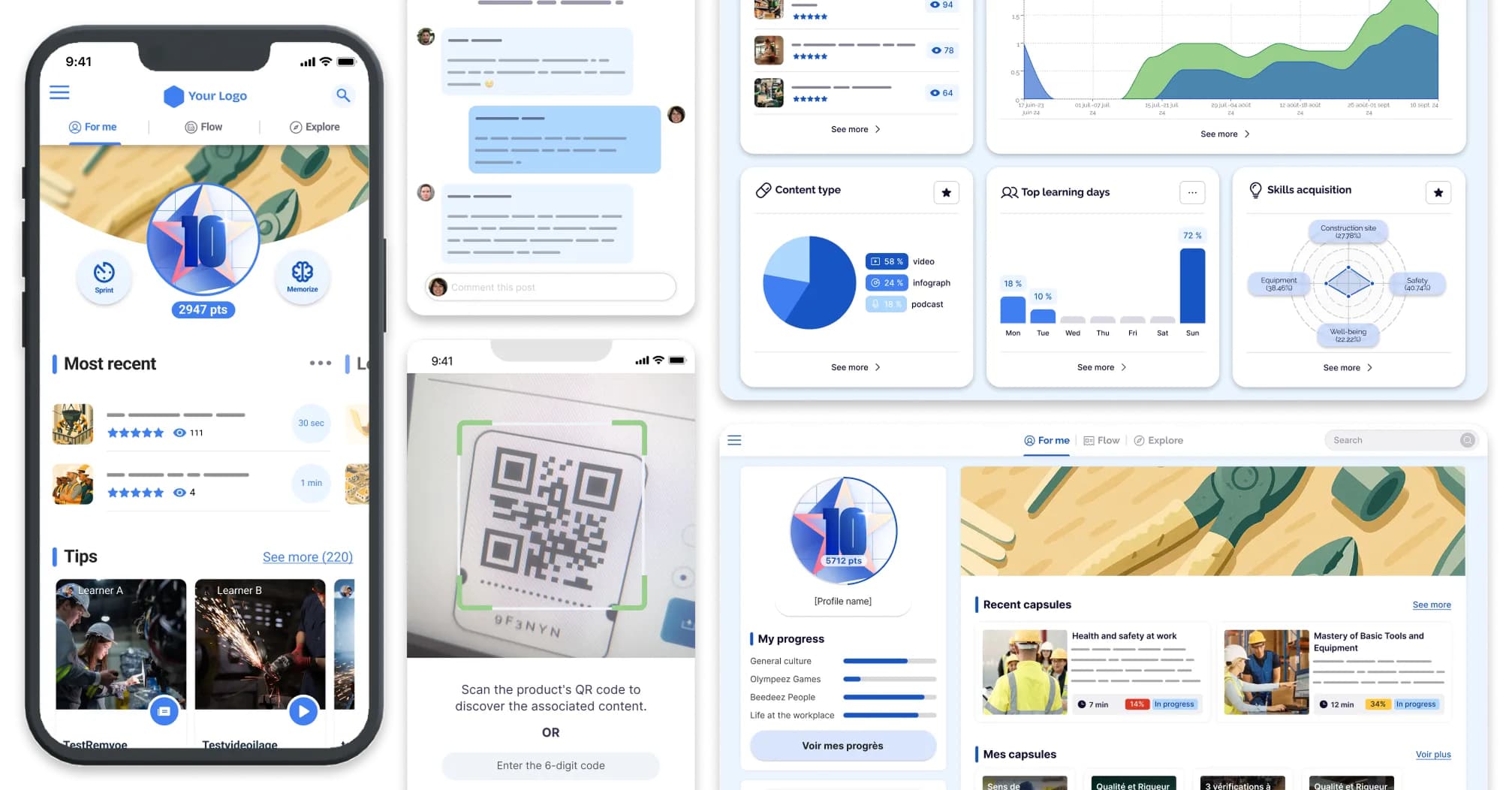
Beedeez is an LMS dedicated to frontline teams. Beedeez's authoring tool helps a business team turn operational know-how into content that can be distributed quickly, without forcing a detour through an e-learning studio or a highly technical profile.
Beedeez's distinctive point lies in real use. Training should keep pace with the job, not slow it down. When your creators are store managers, network leads, internal trainers or product experts, they need a tool that is simple to onboard, designed for bite-sized formats and for immediate distribution to frontline teams.
- Create a module from a blank page, an existing document or a field need raised by a manager.
- Adapt the same content to several populations, several entities or several languages without starting from scratch.
- Distribute capsules accessible on the move, including for teams with no fixed workstation.
- Combine creation, coaching, knowledge sharing and tracking within the same LMS platform.
This logic produces concrete uses. Beedeez shows a 95% completion rate on capsules, versus 20 to 40% in the industry, 156 capsules completed per employee per year, and a presence across 55 countries in 26 languages for 2.3 million users. These figures matter if your goal isn't only to publish content, but to get it consulted and then put into practice.
30% of franchises with the best commercial performance all record a training completion rate of at least 90%.
Amorino's feedback is a reminder of a simple reality: the real skill is the one you put into practice. If your aim is to pass on gestures, standards or sales arguments quickly to scattered operational teams, Beedeez is worth examining as a priority.
Why Beedeez often comes up when looking for an LMS authoring tool with no technical skills
Beedeez often comes up on this query because the platform tackles three topics at once that teams often mix up: autonomous creation, mobile distribution and putting it into practice in the field. A useful LMS authoring tool doesn't just build a module. It must also help knowledge circulate at the right time, in the right format and in the right place.
| What users look for | What Beedeez delivers |
|---|---|
| Create on their own with no technical expertise | Built-in authoring tool to design, adapt and publish with no external dependency |
| Train frontline teams | Experience designed for learning on the move, including with no connection |
| Produce more content faster | Business AI to generate content 4x faster |
| Prove real use | 95% completion, 92% engagement at Picard, a 4.9/5 customer rating across 120 reviews |
Didask - Creation guided by cognitive science
Didask leans on a unique pedagogical AI, developed by cognitive science researchers, to guide creators toward the most effective formats given the learning objectives. The authoring tool lets you import existing content directly (slides, PDF, Notion) and offers automatic path structuring, with adaptive assessments to reinforce memory anchoring.
The platform is particularly suited to training organisations and to companies looking for strong pedagogical guidance, but it's less geared toward mobile creation or frontline profiles.
360Learning - Collaborative creation
360Learning positions itself as a collaborative LMS, where each subject-matter expert can create and share training directly from the platform, with no technical skills. The authoring tool, enriched by AI, enables co-creation and fast iteration of content.
The platform is ideal for growth companies that want to capitalise on internal expertise and drive engagement through feedback and collective contribution mechanisms.
However, some advanced features (reporting, administration) may need a learning curve.
TalentLMS - Fast and simple creation
TalentLMS is known for its intuitive interface and immediate onboarding, with standard templates and AI-assisted creation. The platform offers basic features (quizzes, SCORM import, video) and is particularly suited to SMBs or organisations looking for a simple, cost-effective solution.
It offers good multi-device accessibility, but lacks advanced interactive formats and a deep pedagogical AI.
iSpring Learn - Creation based on PowerPoint
iSpring Suite turns your PowerPoint presentations into interactive modules (quizzes, dialogue simulations, screencasts) in a few clicks.
The tool is familiar to PowerPoint users and allows easy export in SCORM/xAPI. It's ideal for organisations that already have PowerPoint content to leverage, but it requires installing a desktop software (iSpring Suite) and is less natively integrated to the LMS.
Apolearn - Collaborative and pedagogical creation
Apolearn combines a complete LMS and an intuitive authoring tool, supported by a generative AI to turn your documents into interactive paths. The platform supports more than 200 file formats and is designed for education professionals and training organisations.
It emphasises collaboration and accessibility, but is less geared toward the operational needs of frontline teams.
AI in the authoring tool: what it changes in 2026
AI in an LMS authoring tool mainly changes production speed and the level of personalisation, provided it is genuinely built into the creation work. In 2026, the right question is no longer « is there AI? » but « what does it let you do without adding a layer of complexity? ».
Superficial AI rephrases a text. Deeply integrated AI helps structure content, adapt it to a business level, decline it across contexts of use and support learners once the module is published. That's where the gap widens between marketing argument and real gain.
| Use | Lightly integrated AI | AI built into the LMS |
|---|---|---|
| Initial creation | Occasional help with writing | Framed generation from your use cases and your content |
| Business adaptation | Little operational context | Tuning to the level, the job and the field |
| Distribution | Outputs raw content | Publication within a path, with tracking and reminders |
| Help after publishing | None or very limited | Assistant able to answer operational questions |
At Beedeez, the AI follows this business logic. It helps produce content 4x faster, but also better targets field situations, products, protocols and the real questions operational teams ask day to day.
This matters because 50% of frontline workers say they don't have time to train and 61% have no access to mobile training. Useful AI in an LMS must therefore reduce the creation effort for designers, then reduce the access effort for learners.
Creating training shouldn't be a blocker any more. Request a demo to discover how, with Beedeez, your teams can produce their content autonomously, directly from the field and for the field.